ZHEJIANG TOPMB ELECTRICAL LIGHTING CO.,LTD.
Search

What is Asymmetric Lighting in Desk Lamps

Proper lighting is essential for creating a productive and comfortable workspace, especially for those who spend hours in front of computer screens. Traditional lighting solutions often cause glare, leading to eye strain and reduced efficiency. Asymmetric lighting, a technology pioneered by TOPMB, offers a solution by directing light precisely where it’s needed. This article explores what asymmetric lighting is, how it works, and its benefits in desk lamps, particularly monitor light bars.

What is Asymmetric Lighting?

Asymmetric lighting refers to a light beam that is projected at an angle rather than straight down. Instead of shining directly underneath the lamp (like most traditional desk lamps), an asymmetric desk lamp casts light across your workspace from the side, illuminating the desk without reflecting on screens or directly into your eyes.

Key Characteristics:

  • Indirect light projection

  • Focused on task area, not surroundings

  • Reduces glare and screen reflection

  • Minimizes shadows and hotspots


How Does Asymmetric Lighting Work?

An asymmetric lamp controls where the emitted light travels before it reaches the working surface. Depending on the product design, this can be achieved with optical lenses, reflectors, shields, light guides, or a combination of these components.

Instead of allowing the LED output to spread equally around the fixture, the optical system redirects a larger portion of the beam toward the intended task area.

In a monitor light bar, that task area is usually the desk in front of the display. The optical cutoff limits the amount of light traveling back toward the screen or upward toward the user's eyes.

The result depends on both optical design and installation. Even a well-designed asymmetric lamp should be positioned and angled correctly for the monitor height, screen tilt, and desk depth.

For practical installation guidance, see how to set up a monitor light bar without creating unnecessary screen reflections.

Benefits of Asymmetric Lighting in Desk Lamps

Better Control of Screen Reflections

For computer work, the main advantage is control over where the beam travels. Directing more light toward the desk and less toward the display reduces one common source of screen reflection.

This does not mean every asymmetric lamp will automatically eliminate glare. Screen coating, monitor tilt, lamp position, beam cutoff, and surrounding light all affect the final result.

Less Direct Light Toward the User

A well-controlled beam can illuminate the work surface without placing the brightest part of the lamp in the user's direct field of view. This is particularly useful for screen-mounted or high-positioned task lights.

More Useful Task Lighting

Instead of illuminating every surrounding surface equally, an asymmetric desk lamp can concentrate more of its output on the keyboard, documents, drawing area, or other working surface.

This is especially useful when the purpose of the lamp is task lighting rather than general room illumination.

Why Monitor Light Bars Use Asymmetric Lighting

A monitor light bar sits directly above the display, so uncontrolled downward or backward light can easily reach the screen. This makes beam control particularly important.

With asymmetric optics, the useful beam can be directed forward and downward toward the keyboard and desk while limiting light toward the display. This is one reason asymmetric lighting has become closely associated with modern monitor-light designs.

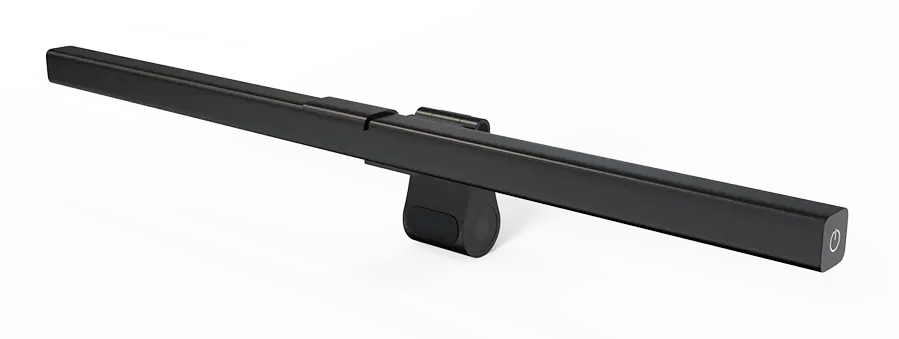
TOPMB's PHX003, for example, uses asymmetric optics and provides 255 lm output, more than 750 lux at 50 cm, and CRI above 95. The model also supports adjustable brightness, 3000K–6500K color temperature, a light sensor, and memory function.

These specifications address different aspects of task lighting: the asymmetric optical system controls where the light goes, while brightness, color temperature, and CRI determine other characteristics of the illumination.

Asymmetric Lighting vs. Symmetric Lighting: What's the Difference?


FeatureAsymmetric LightingSymmetric Lighting
Light DistributionDirects more light toward a selected area or directionDistributes light more evenly around corresponding directions
Primary GoalControlled, directional task illuminationBroad or balanced illumination
Screen WorkCan help limit light reaching the displayEffect depends more strongly on lamp placement and shielding
Glare ControlOptical cutoff can be designed around the task areaCan also control glare, but is not inherently optimized for one direction
Typical UsesMonitor lighting, task lighting, work surfaces, selected architectural applicationsGeneral desk lighting, room lighting and applications requiring broader distribution
Better Choice WhenLight needs to be concentrated away from unwanted areasThe objective is wider, more uniform general illumination
Neither distribution is universally better. The correct choice depends on where the light is needed. For a general desk or room, broad symmetric illumination may work well. When a fixture needs to illuminate a specific surface while limiting light toward a monitor or viewer, asymmetric distribution offers more precise control.


Does Asymmetric Lighting Automatically Mean No Glare?

No. Asymmetric optics can reduce unwanted light in specific directions, but the final result still depends on how the lamp is designed and installed.

For a computer workstation, check the setup from the user's normal seated position. The LED source should not be directly visible at an uncomfortable brightness, and the screen should not show a noticeable hotspot or reflected light band.

Monitor height, display tilt, desk depth, optical cutoff, and lamp angle can all change the result. This is why “asymmetric” should describe the beam-distribution principle rather than be treated as a guarantee of zero glare.

Where Is Asymmetric Lighting Most Useful?

Computer Workstations

Computer work is one of the clearest applications because the lighting system needs to illuminate the desk while limiting unwanted light on the display. Screen-mounted lamps are designed around this specific geometry.

Users comparing screen-mounted and conventional lighting can also see our monitor light bar vs desk lamp guide.

Wide Desks and Multi-Monitor Workspaces

Larger desks introduce a different requirement: controlled lighting also needs enough horizontal coverage. A wider asymmetric fixture can direct useful light across the work surface without relying on broad uncontrolled spill.

For larger work areas, TOPMB's ultra wide LED desk lamp range combines wide desk coverage with asymmetric optics.

Laptop Workstations

Laptop screens usually have thinner display housings and a smaller working footprint. In this situation, asymmetric optics can still be useful, but the mounting structure needs to suit a lighter and thinner screen.

TOPMB also offers a laptop screen lamp range designed for laptop displays.

TOPMB's Experience With Asymmetric Optical Desk Lighting

TOPMB has focused on asymmetric optical desk lighting since the early development of the company. We began developing asymmetric-optical screen lamps in January 2018 and launched a dedicated asymmetric optical eye-care lamp R&D project in June of that year.

Our development work includes utility-model patent technology related to asymmetric optics and product designs for different workstation configurations. Today, asymmetric optical designs are used across selected TOPMB monitor lights, laptop lights, working lamps, and wide desk-lighting products.

For OEM and ODM projects, optical design is considered together with the intended mounting position, desk coverage, monitor structure, brightness controls, color temperature, and other functional requirements.


FAQs

1. What does asymmetric lighting mean?

Asymmetric lighting means the light is projected at an angle rather than straight down, avoiding glare on screens and illuminating your work surface more effectively.


2. Is asymmetric lighting better for computer work?

Yes. It minimizes reflections on monitors and provides more comfortable and focused lighting for prolonged screen time.


3.  Can asymmetric light bars replace desk lamps?

For screen-heavy tasks, yes. They save desk space, reduce eye strain, and provide superior illumination with modern design.


4. What type of lighting is best for eye health?

The best lighting for eye comfort is glare-free, evenly distributed asymmetric lighting with adjustable color temperature and brightness.

Asymmetric lighting is more than just a trend—it's a science-backed upgrade for modern workspaces. Whether you’re working, studying, or gaming, switching to a TOPMB asymmetric desk lamp or monitor light bar will redefine how you experience lighting.


Read Lamp
Latest News about TOPMB
linda-new
sale@homestarlight.com
+86-571-87231206